
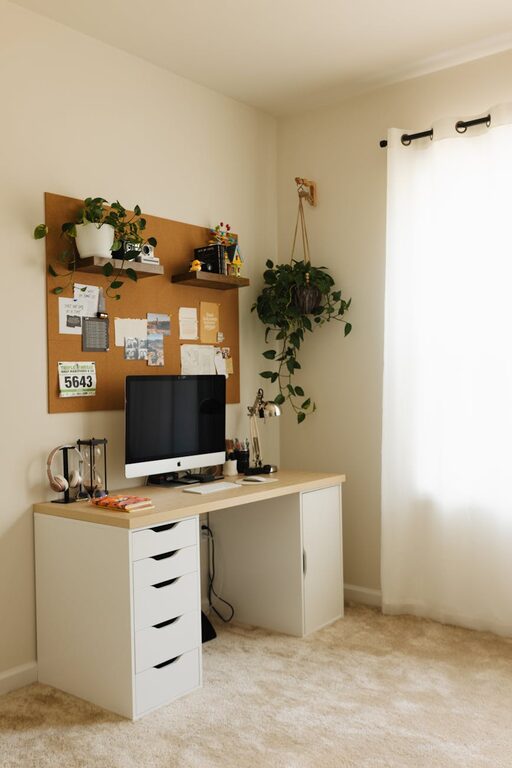
Creating a cozy and functional home workspace can make a significant difference in how we work and feel throughout the day. Whether you work remotely, study, or simply need a dedicated area for projects, having a space that inspires focus while offering comfort is key. In this post, we will explore helpful tips to design a home workspace that balances practicality with a welcoming atmosphere.
Why a Cozy and Functional Workspace Matters
A workspace is more than just a desk and a chair. It can affect your mood, productivity, and overall well-being. When your workspace is neat, well-lit, and personalized, you’re more likely to stay motivated and avoid distractions. On the other hand, a cluttered or uncomfortable space can lead to fatigue and frustration.
With the right approach, creating a workspace that suits your needs doesn’t require a large room or an expensive setup. Small changes and thoughtful details can transform any corner of your home into a productive haven.
Choosing the Right Location
Selecting the ideal spot for your workspace is the foundation of good design. Consider these factors:
– Natural Light: Position your desk near a window if possible. Natural light improves mood and reduces eye strain.
– Quiet Environment: Choose a low-traffic area to minimize interruptions and background noise.
– Space Availability: Ensure there’s enough room for your equipment, storage, and movement.
– Ventilation: Good airflow contributes to comfort during long working hours.
If space is limited, look for creative solutions like converting a section of the living room or bedroom, or using a foldable desk.
Selecting Functional Furniture
Furniture plays a crucial role in making your workspace both comfortable and efficient.
Desk
– Choose a desk with enough surface space for your computer, notebooks, and essentials.
– Consider desks with built-in storage or cable management features to keep wires tidy.
– Adjustable desks or standing desks can add versatility and promote better posture.
Chair
– Invest in an ergonomic chair with proper lumbar support and adjustable height.
– Comfort is essential to prevent back pain and fatigue during extended use.
– If ergonomics isn’t your priority, use cushions or lumbar rolls for extra support.
Storage
– Utilize shelves, drawers, or storage bins to organize supplies and documents.
– Clear containers can help quickly identify contents without opening them.
– Vertical storage saves floor space and keeps your desk clutter-free.
Lighting: Combining Function and Comfort
Proper lighting prevents eye strain and creates an inviting atmosphere.
– Use a combination of natural and artificial light.
– A desk lamp with adjustable brightness can focus light on your tasks.
– Choose bulbs with a color temperature close to daylight (around 5000K) for clear visibility.
– Avoid harsh overhead lighting or strong glare on your monitor.
Organizing for Productivity
A tidy workspace fosters focus and reduces stress. Try these organization tips:
– Keep only daily essentials on your desk; store other items away.
– Use cable clips and holders to manage cords neatly.
– Employ drawer organizers to separate stationery and small tools.
– Schedule regular decluttering sessions to maintain order.
Personalizing Your Space
Adding personal touches makes your workspace feel cozy and motivating.
– Incorporate plants to bring freshness and improve air quality.
– Hang artwork, photos, or inspiring quotes that uplift you.
– Choose colors and textures that make you feel calm and focused.
– Use soft textiles like rugs or cushions to add warmth.
Technology and Accessories
Ensuring your technology supports your work style is essential.
– Position your monitor at eye level to avoid neck strain.
– Use a wireless keyboard and mouse to reduce clutter.
– Employ noise-canceling headphones if your environment is noisy.
– Keep chargers and accessories handy but out of the way.
Creating Boundaries and Routines
Especially when working from home, it helps to set boundaries:
– Define your workspace as distinct from living areas.
– Establish working hours to separate work from personal time.
– Use rituals like a morning walk or making coffee to signal the start of your day.
Final Thoughts
Designing a cozy and functional home workspace is a personal journey that combines comfort, style, and practicality. By focusing on lighting, furniture, organization, and personalization, you can create an environment that supports your work and well-being. Remember, small changes and thoughtful choices can significantly enhance your daily experience.
Take your time to experiment with different layouts and elements until you find what works best for you. Happy decorating!